_EU_1.0_overview_01_2-Pack_normal_20250903014858j.jpg)
_EU_1.0_overview_02_normal_20250903015000i.jpg)
_EU_1.0_overview_03_normal_20250915030925e.jpg)
_EU_1.0_overview_04_normal_20250903015034u.jpg)
_EU_1.0_overview_05_normal_20250903015126q.jpg)
_EU_1.0_overview_06_normal_20250903015143v.jpg)
_EU_1.0_overview_07_normal_20250903015159v.jpg)
_EU_1.0_overview_08_normal_20250903015215g.jpg)
_EU_1.0_overview_09_normal_20250903015229g.jpg)
(EU)_1.0-240x234x116mm-7000001548_normal_20250903015246u.png)
_EU_1.0_overview_01_2-Pack_large_20250903014858n.jpg)
_EU_1.0_overview_02_large_20250903015000k.jpg)
_EU_1.0_overview_03_large_20250915030925s.jpg)
_EU_1.0_overview_04_large_20250903015034a.jpg)
_EU_1.0_overview_05_large_20250903015126a.jpg)
_EU_1.0_overview_06_large_20250903015143l.jpg)
_EU_1.0_overview_07_large_20250903015159a.jpg)
_EU_1.0_overview_08_large_20250903015215b.jpg)
_EU_1.0_overview_09_large_20250903015229b.jpg)
(EU)_1.0-240x234x116mm-7000001548_large_20250903015246b.png)
Deco PX10
AX1500 + AV1000 Tüm Ev Powerline Mesh WiFi 6 Sistemi
- AX1500 Çift Bant WiFi – 1201 Mbps (5 GHz) + 300 Mbps (2.4 GHz).†
- HomePlug AV2 1000 Mbps – 1 Gbps Powerline Ağ hızları ***
- Ağ Duvarlardan ve Katlardan Geçer – Duvarların ve diğer engellerin sinyal üzerindeki etkisini azaltır.
- Yapay Zeka Destekli Mesh – Evinize özel ideal WiFi sağlamak için ağ ortamınızı akıllıca öğrenir.*
- Gigabit Kablolu Hız – 3× Gigabit port yeterli bağlantı sağlar.§
- HomeShield – Kapsamlı ağ koruması, güçlü ebeveyn kontrolleri ve gerçek zamanlı IoT güvenliği sağlar.**
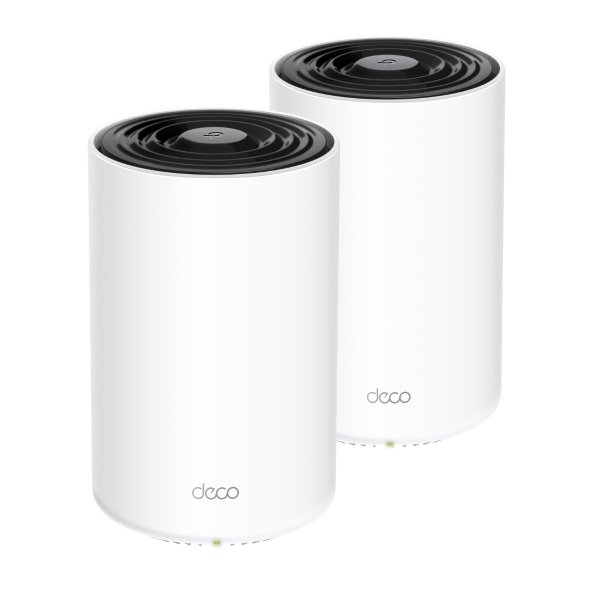
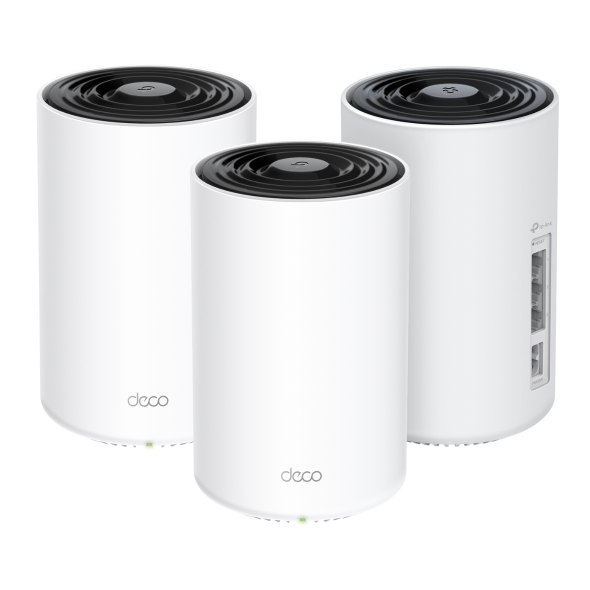
Üstün Mesh WiFi. Her Yerde.
Tüm Ev Powerline Mesh Wi-Fi 6 Sistemi AX1500 + AV1000
Deco PX10




Çift Bant WiFi 6 AX1500
HomeShield
Güvenliği
Yapay Zeka Destekli
Mesh
Kapsama Alanı
2'li Paket
4.100 ft² / 380 m²
3'lü Paket
6.100 ft² / 530 m²
Bağlanabilir Cihaz
120 Cihaza Kadar
HomePlug AV2
1000 Mbps
Mesh WiFi 6 + Powerline: Duvarları Aşan Sinyal
Deco PX10, Deco birimleri arasında veri iletmek için çift bantlı WiFi ve Powerline teknolojisini birleştirir. Powerline teknolojisi, Deco birimleri arasında daha güçlü bir bağlantı oluşturmak için evinizin elektrik kablo tesisatını kullanarak duvarların, zeminlerin ve diğer engellerin sinyaller üzerindeki etkisini azaltır. ***
İnternet
AV1000 Gigabit Powerline
Kalın Duvar
Çift Bant WiFi 6 Mesh
WiFi 6 teknolojisi ile donatılmış Deco tüm ev mesh WiFi, kapsama alanında, hızda ve toplam kapasitede büyük bir artış sağlamak üzere tasarlanmıştır. Daha hızlı yüklemenin ve daha fazla bağlantının keyfini çıkarın.
-
4× Daha Geniş Kapasite
-
3× Daha Hızlı Hız
-
Gelişmiş Kapsama Alanı
Süper Hızlı. Gecikmesiz.
WiFi + Powerline Hibrit Bant Genişliği
Powerline ve kablosuz bağlantılar, Deco birimleri arasında veri iletmek için birlikte çalışır. PX10, geleneksel mesh WiFi'a kıyasla olağanüstü hızlar sunar.
-
Deco PX10 (WiFi + Powerline)
1201 Mbps
300 Mbps
1000 Mbps
-
Geleneksel Mesh WiFi
Geniş Kapsamlı WiFi Kapsama Alanı
Evinizin tamamını WiFi ile donatmak için Deco PX10 birimleri, her köşedeki bağlantılar için daha geniş kapsama alanını artırmak üzere güçlü bir mesh ağı olarak birlikte çalışır. Daha fazla kapsama alanı mı istiyorsunuz? Sadece başka bir Deco ekleyin. Tüm TP-Link Deco modelleri birlikte çalışabilir.†
-
 1'li Paket
 -
 2'li Paket
 azami 4.100 ft² veya 380 m²
 -
3'lü Paket azami 6.100 ft² veya 530 m²


Daha Fazla Cihaz İçin
Daha Fazla Kapasite
OFDMA ve MU-MIMO teknolojisine sahip WiFi 6 ile geliştirilen Deco PX10, 120 cihaza kadar bağlantı kurmanıza olanak tanır. Performansı düşürmeden daha hızlı yükleme yapan daha verimli bir ağın keyfini çıkarın.
Oyun
8K Yayın Akışı
Telefonlar ve
Tabletler
1080P Yayın Akışları
Akıllı Ev
Cihazları
Yüksek Hızlı
İndirme
4K Yayın Akışı
IP Kamera
Yayın Akışı
Web'de Gezinme
şunlar için bağlantı:
120
cihaza kadar
Daha Akıllı Bir Ev İçin Akıllı Ağ Oluşturma
Deco, ağınızdaki bağlantıları otomatikleştirmek için özel algoritmalarını kullanarak her zaman mümkün olan en güçlü sinyalleri sağlar.△
AI Destekli Mesh Hakkında Daha Fazla Bilgi Edinin >>
-
Gelişmiş Algoritmalar
-
Kendi Kendine Öğrenme Yeteneği
-
Özelleştirilmiş Wi-Fi
Kendi Kendine Öğrenme
Gelişmiş Algoritmalar
Tek WiFi Adıyla Kesintisiz Dolaşım
TP-Link Mesh, Deco birimlerinin tek bir birleşik ağ oluşturmak için birlikte çalışması anlamına gelir. Telefonunuz veya tabletiniz evinizde dolaşırken otomatik olarak en hızlı Deco'ya bağlanarak gerçekten kesintisiz bir WiFi deneyimi yaratır.‡
-
Tüm Ev Kapsama Alanı
Evinizdeki zayıf sinyal alanlarını ortadan kaldırın
-
Kesintisiz Dolaşım
Odalar arasında hareket ederken kesintisiz yayın
-
Tek WiFi Adı
Artık WiFi ağ adlarını değiştirmeye son
-
Birleşik Yönetim
Deco Uygulaması üzerinden merkezi düğümü yöneterek ev WiFi'ınızı kontrol edin
-
Deco PX10
Mesh Wi-Fi Sistemi Wi-Fi Home-Deco Wi-Fi
-
Menzil Genişleticili Geleneksel
Router Wi-Fi

Akıllı Yaşam İçin Akıllı Güvenlik
HomeShield, evde veya hareket halindeyken tüm cihazlarınızı çeşitli özelliklerle kapsamlı bir şekilde koruyan bir dizi yerleşik hizmet sunar. HomeShield ile daha güvenli internet deneyimleri, akıllı yaşamınıza daha fazla mutluluk getirir.
-
Ağ Koruması
Gateway cihazınızı basitçe yapılandırın ve tüm ev ağ güvenliğini sağlayın. HomeShield, olası riskleri tarayıp tespit ederek ağınızı inceler ve ağınıza zarar vermeden önce bunları engeller.*
-
Ebeveyn Denetimleri
Ebeveyn Denetimleri, çocuklarınızın çevrim içi eğlenirken güvende kalmalarını sağlamak için uygulama engelleme, web filtreleme, YouTube kısıtlamaları, SafeSearch ve çevrim içi süre sınırları belirlemelerine yardımcı olarak onları korur.*
-
Evden Uzaktayken de Korumayı Sürdürün
KidShield Uygulaması
Cihaz Güvenliği Uygulaması
Cihaz güvenliği uygulaması ile cihazlar her yerde güvende kalır. KidShield sayesinde ebeveynler çocuklarının konumlarını izleyebilir. Bu sayede çocuklar hareket halindeyken bile dijital olarak koruma altında kalır.*
Deco Uygulaması ile Kolayca Tak ve Çalıştır
Kullanıcı dostu TP-Link Deco uygulamasıyla ağınızı istediğiniz zaman ve istediğiniz yerden kurun ve yönetin. Sadece üç kolay adımda evinizin tamamı güçlü ve güvenilir WiFi ile donatılabilir. Bir Deco'yu kurun; aynı setteki diğer Deco, güç verildikten sonra otomatik olarak mesh ağına katılabilir.
-
1 Bağlayın
bir modeme bağlayın ve her ikisini de çalıştırın. -
2 İndirin
ve Deco uygulamasını başlatın. -
3 Yapılandırın
uygulama içi talimatları izleyerek. -
4 Çalıştırın
aynı setteki Deco'ya güç verin.
İstediğiniz Gibi Kontrol Edin
-

Kolay Yönetim
Deco uygulamasından evde veya uzakta WiFi'ınızı yönetin. Bağlı tüm cihazları görün, kendinizinkilere öncelik verin ve bir konuk ağı kurun.
-

Sesli Kontrol
Deco PX10'u yalnızca sesinizle kontrol etmek için Amazon Alexa veya Google Asistan özellikli bir cihaz kullanın.

-

Tüm Deco'lar Birlikte Çalışır
Deco PX10, bir Mesh ağı oluşturmak için diğer tüm Deco modelleriyle uyumludur. İstediğiniz zaman daha fazla Deco ekleyerek Mesh WiFi kapsama alanını genişletin.***
Not: Kablosuz olarak tüm Deco modelleriyle uyumludur ancak yalnızca HomePlug Standardı aracılığıyla powerline bağlantılarını destekler.
-
Bodrum

-
Bahçe

-
Garaj

Uyarlamalı Yol Seçimi
Deco birimleri, tek bir birleşik ağ oluşturmak için birlikte çalışır. Siz evde dolanırken telefonunuz veya tabletiniz en hızlı Deco'ya otomatik olarak bağlanarak gerçek anlamda sorunsuz bir çevrimiçi deneyim oluşturur. IEEE 802.11r ve 802.11k/v desteği, bir Deco'dan diğerine geçişin son derece sorunsuz gerçekleştiği, İnternet yayını sırasında bile bu geçişin fark edilmediği anlamına gelir.


-
Adaptif Yol Seçimi
TP-Link Mesh Teknolojisi verileriniz için dinamik olarak en iyi rotayı ve bandı en iyi rotayı ve band seçerek evin neresinde olursanız olun
hızlı bağlantıyı garanti eder. 

-
Kendi Kendini Onarma
Bir Deco'da sorun varsa sistem,
çevrimiçi kalmanız için otomatik olarak
diğer Deco'lar aracılığıyla verileri yeniden yönlendirir.
Wi-Fi + Powerline
Enerji hattı bağlantıları, Deco'ları bağlamak için evinizin elektrik devresini kullanarak en kalın duvarları ve tavanları bile geçer.
Enerji hattı ve kablosuz bağlantı birleşimi, yalnızca kablosuz bağlantısına kıyasla %60 daha yüksek ağ hızı elde eder.
- Daha yüksek hız
- 60%
- Standart Wi-Fi Sistemi
- Hibrit Wi-Fi Sistemi
- Powerline
- Note:Wi-Fi + Powerline sadece Deco P7 bulunur!
IoT Nesnelerin İnterneti Mesh
Geleneksel akıllı hub'lardan farklı olarak, TP-Link Mesh Teknolojisi,tek bir sistemde entegre Wi-Fi, Bluetooth ve Zigbee ile evin tamamanıda nesnelerin interneti kapsamı sağlar.TP-Link Mesh Teknolojisi ile her odada akıllı evinizindeki sihrin tadını çıkartın. Sayısız hub'a elveda diyin.
- - - - Wi-Fi
- - - - Zigbee
- - - - Bluetooth
TP-Link Karma Teknolojisi
neden sektör lideri bir çözümdür?
| Tam Karşılaştırma | |||
| Model Numarası | TP-Link Deco | Netgear Orbi | Google WiFi |
| Kablosuz Ana Taşıyıcı | Tri-Band (2.4G+5G_1+5G_2)¹ | Single-Band (5G_1 Only) | Dual-Band (2.4G+5G) |
| Mesh Protokol Desteği | IEEE 802.11k/v/r | IEEE 802.11k/v | IEEE 802.11s |
| Gerçek Anlamda Sorunsuz Dolaşım | √ | × | × |
| APS(Adaptif Yol Seçimi) | √ | × | √ |
| IoT Mesh | √² | × | × |
| Powerline Backhaul | √³ | × | × |
| Wireless + Powerline Bant kontrol | √4 | × | × |
| Band Steering | √ | √ | √ |
| AP Steering | √ | √ | √ |
| Kendini Onarma | √ | √ | √ |
| Notlar: 1 ve 2: Deco M9 Plus için Yalnızca 3 ve 4: Deco P7 için Yalnızca Aralık 2017 Tarihli Teknik Özellikler | |||
Deco Series
Deco
-

Deco BE85
BE19000 Üç Bantlı Tüm Ev İçin Mesh Wi-Fi 7 Sistemi
-

Deco X60
AX5400 Tüm Ev Mesh Wi-Fi 6 Ünitesi
-

Deco XE75
AXE5400 Üç Bantlı Mesh Wi-Fi 6E Sistemi
-

Deco S7
AC1900 Tüm Ev Mesh Wi-Fi Sistemi
-
_normal_20230201014412u.png)
Deco M4
AC1200 Tüm Ev Mesh Wi-Fi Sistemi
-

Deco BE65
BE9300 Tüm Evler için Mesh Wi-Fi 7 Sistemi
-
_Overview_normal_20211225093625r.png)
Deco X50
AX3000 Tüm Ev Mesh WiFi 6 Sistemi
-
Deco X20
AX1800 Whole Home Mesh Wi-Fi 6 System
-

Deco X50-PoE
AX3000 Whole Home Mesh WiFi 6 System with PoE
Sadece Parmaklarınızı Kullanarak Deco Ağı'nı Yapılandırın !
Deco uygulaması iOS veya Android cihazlarınızla Deco Bütün Ev Mesh Wi-Fi Sisteminizi kurmanın, yönetmenin ve izlemenin en kolay yolunu sunar.
Kurulum Çok Daha Kolay
Deco'yu kutudan çıkarıp Prize takın, uygulamayı yükleyin ve sonra ekrandaki talimatları izleyin. Deco uygulaması gerisini halledecek ve ağınızı birkaç dakika içinde kullanıma hazır hale getirecektir.
-
Deco'yu kablo modeminize bağlayın ve her iki cihazı da açın
-
Deco uygulamasını indirin ve başlatın
-
Deco sisteminizi yapılandırmak için uygulama içi talimatları izleyin.
Yönetimi Basit
Deco, Evde, işte veya herhangi bir yerdeyken, Wi-Fi'nizi istediğiniz yerden yönetmeyi kolaylaştırır.
-
Basit Yönetim Ekranı
Ağınızın çalışma durumunu görüntüleyin, bağlı cihazları kontrol edin ve yönlendiricinizin sunduğu tüm özellikleri edinin..
-
Birden Çok Deco, Tek Uygulama
Deco uygulaması, Deco Wi-Fi'inize bağlı tüm Deco ağlarınızı ve cihazlarınızı yönetir.
-
Bağlı Cihazları Kontrol Edin
İnternet erişimini duraklatma ve sürdürme, internet hızını test etme ve cihazlara öncelik verme veya engelleme özelliği olan bağlı cihazlarınızın listesini görüntüleyin.
-
Uzaktan Yönetim
Nerede bulursanız olun, telefonunuzun bir dokunuşuyla ağın uzaktan kontrolünü elinize alın.
Güçlü Ebeveyn Denetimleri
Basit, sezgisel ebeveyn denetimleri, çocuklarınızı çevrimiçiyken güvende tutmayı kolaylaştırır.
-
Her aile üyesi için kolayca bir profil oluşturun ve özel zaman sınırlarını ve çevrimiçi zaman ayırmalarını ayarlayın. Aygıtları profillere atamayınböylece kuralların tek tek aygıtlara ve aile üyelerine yayabilirsiniz.
-
Ailenizin içeriğe uygunluğunu engelleyen tek dokunuşla güvenlik ayarları ile ailenizi çevrimiçi ortamda güvende tutun.
-
Ailenizdeki her bir kişinin çevrimiçi ortamda ne kadar zaman geçirebileceği ile ilgili sınırları belirleyin.
-
Insights ile çocuklarınızın hangi siteleri ziyaret ettiğini ve her biri için ne kadar zaman harcadıklarını kontrol edebilirsiniz. 'Çevrimiçi ortamda eğlenirken çocuklarınızın güvende olduğunu bilmenin harika bir yolu'.
-
Aile oyun geceleri için Wi-Fi'den biraz dinlenin. Evinizdeki herkes için internet erişimini askıya alabilir için bir düğmeye dokunmanız yeterli.
Özelliklerle dolu Sezgisel Bir Uygulama
Aylık Kullanım Özeti
Kullanım dahil her ay ağ ayrıntılarınızın kapsamlı bir listesine bakın,
engellenen içerik, güvenlik tehditleri ve daha fazlası.
Ev Otomasyonu
Güçlü otomasyon ve ses kontrol araçlarıyla hayatınızı kolaylaştırın.
*Şu anda sadece Deco M9 Plus için
Esnek Kısayol
Tek bir tıklama ile tüm cihazları telefonunuzdan veya tabletinizden esnek bir şekilde kontrol edin.
*Şu anda sadece Deco M9 Plus için
Ağınızı Koruyun
Dahili Antivirüs, kötü amaçlı web sitelerine karşı korunmanıza ve çevrimiçi ödemenizi korumanıza yardımcı olur.
*Sadece Deco M9 Plus, Deco P7 ve Deco M5 için
Cihazlarınıza Öncelik Verin
Hangi cihazın her zaman en hızlı bağlantıya sahip olacağını seçin
veya belirli bir süre için önceliği belirleyin.
Uygulama Önceliklerini Ayarlayın
Basit kontrollerle sizin için en önemli olan faaliyetler için daha fazla bant genişliği tahsis edin.
*Şu anda sadece Deco M9 Plus, Deco P7 ve Deco M5 için
Wi-Fi'yi Arkadaşlarınızla Paylaşın
Misafirler için ayrı Wi-Fi profilleri ayarlayın ve şifreyi
ile paylaşın çevrimiçi atlamalarını kolaylaştırmak.
Hızınızı Kontrol Edin
Run a speed test to ensure you’re getting the internet speeds you’re paying for.
View every device on your network and see how much bandwidth they’re using.
Desteğimiz Her Zaman Arkanızda
Deco hakkında sorularınız mı var? Yardım her zaman sadece bir tık uzaklıktadır. Deco uygulamasında cevapları bulun ve sadece basit bir tıklama ile bizimle irtibata geçmekten çekinmeyin.
DESTEK| Standards and Protocols | Wi-Fi 6IEEE 802.11ax/ac/n/a 5 GHzIEEE 802.11ax/n/b/g 2.4 GHz |
|---|---|
| WiFi Speeds | AX15005 GHz: 1201 Mbps (802.11ax)2.4 GHz: 300 Mbps (802.11ax) |
| Powerline Speeds | HomePlug AV21000 Mbps Powerline |
| WiFi Range | 4-6+ Bedroom Houses (3-pack) TP-Link Mesh TechnologyOptional Ethernet backhaul work together to link Deco units to provide seamless coveragePowerline TechnologyUses your home's electrical wiring to create stronger connections between Deco units, reducing the impact of walls or other obstacles on signal2 × dual-band antennasMultiple antennas form a signal-boosting array to cover more directions and large areas |
| WiFi Kapasitesi | Medium Dual-BandDistribute devices to different bands for optimal performanceMU-MIMOSimultaneously communicates with multiple MU-MIMO clientsOFDMASimultaneously communicates with multiple WiFi 6 clients |
| Working Modes | Router ModeAccess Point Mode |
| Network Security | SPI FirewallAccess ControlHomeShield Security Real-Time IoT ProtectionMalicious Site BlockerIntrusion Prevention SystemDDoS Attack PreventionHome Network Scanner |
|---|---|
| Guest Network | 1× 5 GHz Guest Network1× 2.4 GHz Guest Network |
| WiFi Encryption | WPA/WPA2/WPA3 |
| Ethernet Ports | 3 × Gigabit ports*Per Deco Unit Supports WAN/LAN auto-sensing |
|---|---|
| Butonlar | Reset Button |
| Protocols | IPv4IPv6 |
|---|---|
| Service Kit | HomeShieldLearn More> |
| Parental Controls | HomeShield Parental Controls Youtube RestrictionSafeSearchCustom ProfilesProfessional Content Filter LibraryFamily TimeBedtimeOff TimeTime RewardsFamily Online Time RankingPause the InternetWeekly and Monthly Reports |
| WAN Types | Dynamic IPStatic IPPPPoEL2TPPPTP |
| Quality of Service | HomeShield QoS QoS by Device |
| Cloud Service | OTA Firmware UpgradeTP-Link IDDDNS |
| NAT Forwarding | Port Forwarding UPnP |
| IPTV | IGMP ProxyIGMP SnoopingBridgeTag VLAN |
| DHCP | Address ReservationDHCP Client ListServer |
| DDNS | TP-Link |
| Management Features | Deco App |
| Network Services Enabled by Default | Web Server Manage and configure device through web (HTTP/HTTPS)• Port: 80/443 Protocol: TCP DNS DNS• Port: 53 Protocol: TCP & UDP DHCP Server IP address assignment (DHCP)• Port: 67 Protocol: UDP App management Manage and configure device through app• Port: 22 Protocol: TCP• Port: 20001 Protocol: TCP• Port: 30001 Protocol: TCP• Port: 20002 Protocol: UDP |
|---|---|
| WiFi Transmission Power | CE:<20 dBm (2.4 GHz)<23 dBm (5 GHz)FCC:<30 dBm |
|---|---|
| Dimensions (W×D×H) | 4.1 × 4.1 × 6.7 in (105 × 105 × 169 mm) |
|---|---|
| Package Content | Deco PX10 (3-pack)3× Deco PX10 Units(routers with powerline)1× RJ45 Ethernet Cable3× Power CordsQuick Installation GuideDeco PX10 (2-pack)2× Deco PX10 Units(routers with powerline)1× RJ45 Ethernet Cable2× Power CordsQuick Installation Guide |
| Sertifikalar | CE, FCC, RoHS |
|---|---|
| Ortam | Operating Temperature: 0°C~40°C (32 °F~104 °F)Storage Temperature: -40°C~60°C (-40 °F~140 °F)Operating Humidity: 10%~90% RHStorage Humidity: 5%~90% RH |
†Maksimum kablosuz sinyal oranları, IEEE Standart 802.11 spesifikasyonlarından türetilen fiziksel oranlardır. Gerçek kablosuz veri aktarım hızı, kablosuz kapsama alanı ve bağlı cihaz sayısı garanti edilmez; ağ koşulları, istemci sınırlamaları ve yapı malzemeleri, engeller, trafik hacmi ve yoğunluğu ile istemci konumu dahil olmak üzere çevresel faktörlere bağlı olarak değişiklik gösterir.
‡İstemcilerin 802.11k/v/r desteğine sahip olması gerekir ve ek kurulum gerektirebilir. Performans, istemci cihazına bağlı olarak değişiklik gösterebilir.
△Wi-Fi 6 ve OFDMA, MU-MIMO, 1024-QAM, BSS Color ve WPA3 gibi diğer özelliklerin kullanımı, istemcilerin de ilgili özellikleri desteklemesini gerektirir.
§Kablosuz olarak tüm Deco modelleriyle uyumludur, ancak yalnızca HomePlug Standardı aracılığıyla powerline bağlantılarını destekler. Maksimum Powerline sinyal oranları, HomePlug AV/AV2 spesifikasyonlarından türetilen fiziksel oranlardır. Gerçek Powerline veri aktarım hızı ve Powerline menzili garanti edilmez; elektrik paraziti, trafik hacmi ve ağ ek yükü, AFCI devre kesici ve Powerline'ın ayrı bir devrede bulunması dahil olmak üzere ağ koşulları ve çevresel faktörlere bağlı olarak değişiklik gösterir.
*HomeShield hem temel hem de gelişmiş özellikleri içerir. Gelişmiş özellikler ücretli bir abonelik gerektirir. Ayrıntılar için tp-link.com/homeshield adresini ziyaret edin.
**Wi-Fi nesilleri, IEEE 802.11 a/b/g/n/ac/ax kablosuz standardını temsil eder.
Gerçek ağ hızı; ürünün Ethernet WAN veya LAN Port hızı, ağ kablosu tarafından desteklenen hız, İnternet servis sağlayıcısı faktörleri ve diğer çevresel koşullarla sınırlı olabilir.
Bu Deco, IEEE 802.11ax spesifikasyonunda onaylanan zorunlu özelliklerin tümünü desteklemeyebilir. Özellik kullanılabilirliği için daha fazla yazılım yükseltmesi gerekebilir.